

Pricing Plan
Start with Free Model for your development phase. Pay as you go for production-level models. Get every features since Free Model, no worry about configuration changes.
FREE MODEL
Up To 25 Requests/Day
FREE MODEL
- Features
- AI Chatbot
- Activities Monitoring dashboard
- Seamless tools for working with AI on admin browser
- Image/file/video/audio recognition
- AI request API
- Assistant AI for configuration helping
- Prompt presets
- No time limits
- No token limits
- Runs 24/7
- Model specs
- AI model: Gemini 2.5 Flash
- AI reasoning depth: Basic
- Context length: 45 messages per request
- Remark: After 90 days, request quota is reduced by 50% and response time is increased
STARTER MODEL
THB2 /Request
STARTER MODEL
- Features
- The same features as Free Model
- Unlimited uses while credits active
- Model specs
- AI model: Gemini 2.5 Flash
- AI reasoning depth: Basic
- Context length: 45 messages per request
Price details for LINE chats
- Base: ฿2.00 / Base 5k tokens / Request
- Additional: ฿0.04 / Next 1k tokens / Request
- Price details for AI-Assistant chats
- Base: ฿1.40 / Base 5k tokens / Request
- Additional: ฿0.04 / Next 1k tokens / Request
ADVANCED MODEL
THB4 /Request
ADVANCED MODEL
- Features
- The same features as Free Model
- Unlimited uses while credits active
- Model specs
- AI model: Gemini 2.5 Pro
- AI reasoning depth: Advanced
- Context length: 75 messages per request
Price details for LINE chats
- Base: ฿4.00 / Base 5k tokens / Request
- Additional: ฿0.08 / Next 1k tokens / Request
- Price details for AI-Assistant chats
- Same as Starter Model
ADDON
Smart Knowledge Base 300฿ / month
ADDON
- Upload up to 100,000+ rows of products
- Data schema analysis by AI
- AI-Recommended downloadable file
- No additional charges for AI requests
- Support CSV/Excel
- Free trial 30 days for new user
How A Request Is Counted
For LINE OA Chats

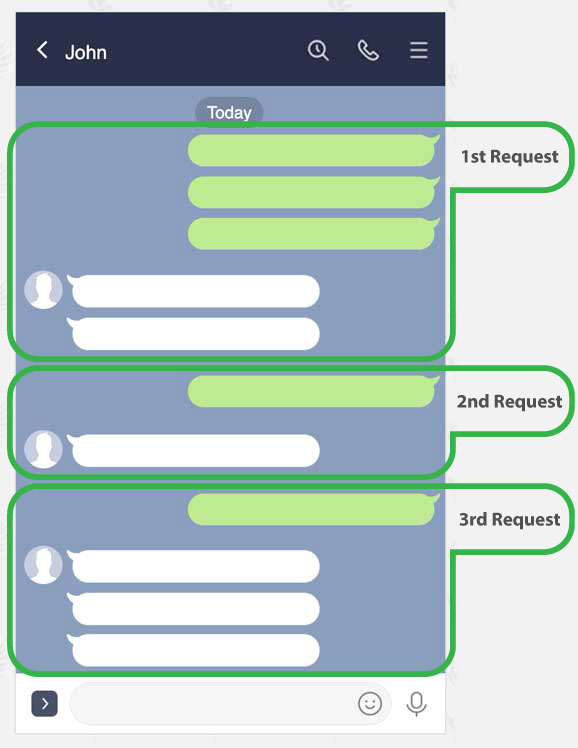
A request is a turn of user's questions and AI's answers

AI wait for continuous messages up to 30 seconds, this feature helps to complete user's context

AI answers may consisted of multiple messages such as text, image, file and flex message, depends on your configuration. All of them counted as one request.
For AI Assistant Chats

A request is counted for a single question submit
Startup Process
Let's Get Started With 4 Steps
1
Initiate LINE Messaging API
Operate via LINE developer console, need to enable messaging API and get channel secret & channel access token

2
Signup A New Quasz Account
Free signup, not require billing information. Click "Account" in the menu bar to start.

3
Connect Quasz To LINE Messaging API
Login to your account to set LINE channel secret and channel access token, also copy quasz webhook url to your LINE messaging API setting

4
Config Prompt Instruction For Your AI Agent
Config prompt instruction and actions for your business with the helping from quasz assistant AI. Then you will be ready to use AI chatbot